


































How to Maintain Your Server Room for Maximum Efficiency
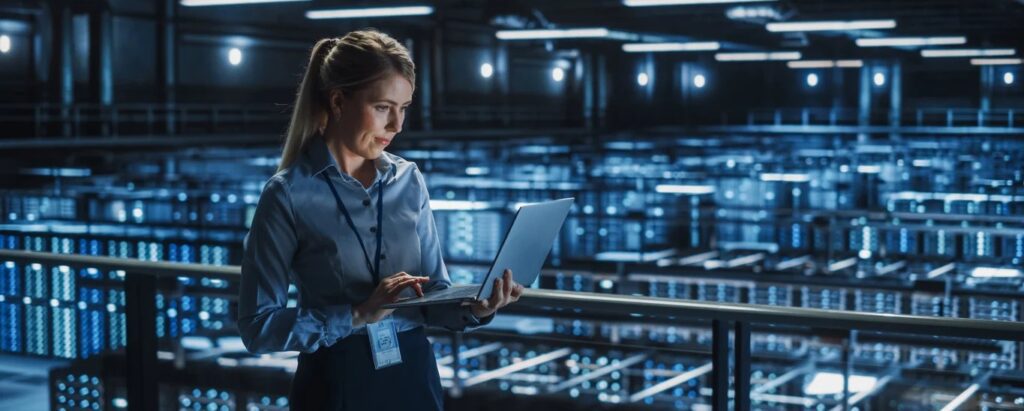
In today’s data-driven world, your server room is the beating heart of your business operations. It’s where your company’s most critical applications and information are stored, processed, and managed. However, many businesses focus solely on server equipment while overlooking the importance of the environment that houses it. To truly optimize performance and prevent costly downtime, it’s essential to maintain your server room for maximum efficiency.
At Empeller Systems, we’ve helped countless businesses across Dubai and the UAE design, manage, and maintain efficient server rooms. In this blog, we’ll share expert insights on how to keep your server room in peak condition — and why it matters more than you might think.
Why Maintaining Your Server Room is Critical
Before we dive into the how-to, let’s talk about the why.
An unmaintained server room can lead to:
- Overheating and hardware damage
- Data loss or corruption
- Increased energy consumption
- Unexpected system crashes
- Shorter hardware lifespan
Proactively maintaining your server room helps you avoid these issues while improving network reliability, security, and operational efficiency.
How to Maintain Your Server Room for Maximum Efficiency
Here are the essential strategies that our experts at Empeller Systems recommend:
1. Control Temperature and Humidity
Why it matters:
Servers generate a lot of heat, and excessive temperatures can lead to equipment failure. High humidity can cause condensation, while low humidity can create static electricity — both damaging to sensitive electronics.
Tip:
- Maintain room temperature between 18°C and 27°C (64°F–80°F)
- Keep relative humidity between 45% and 55%
- Use precision cooling systems, not standard office air conditioning
- Install temperature and humidity sensors with alerts
Empeller Systems can help install and monitor environment controls to ensure optimal climate conditions at all times.
2. Organize Cables Properly
Why it matters:
Messy or tangled cables can obstruct airflow, make maintenance difficult, and even lead to disconnections.
Tip:
- Use labeled cable management trays and racks
- Color-code cables by function (network, power, etc.)
- Avoid running power and data cables too closely to prevent interference
- Keep cables off the floor and neatly bundled
A well-organized setup also speeds up troubleshooting and minimizes the risk of accidental unplugging.
3. Ensure Adequate Ventilation and Airflow
Why it matters:
Poor airflow causes hot spots and inconsistent cooling, increasing the risk of overheating.
Tip:
- Use perforated floor tiles in raised-floor environments
- Arrange servers in hot aisle/cold aisle configurations
- Keep vents and air intakes clear
- Regularly check airflow paths to ensure unobstructed circulation
At Empeller Systems, we design server rooms with intelligent airflow management to reduce cooling costs and enhance equipment lifespan.
4. Keep the Server Room Clean and Dust-Free
Why it matters:
Dust buildup can block fans and vents, leading to overheating or internal damage.
Tip:
- Schedule regular cleaning of all surfaces, including under raised floors
- Use anti-static mats and wear ESD-safe gear during maintenance
- Avoid using standard vacuum cleaners; opt for anti-static vacuums
- Limit foot traffic and restrict entry to authorized personnel only
Installing dust filters on air intakes is also a great preventive measure.
5. Secure Your Server Room
Why it matters:
Server rooms often contain sensitive data and critical systems that must be protected from both physical and cyber threats.
Tip:
- Implement access control systems (keycards, biometrics, etc.)
- Use surveillance cameras for monitoring
- Keep logs of personnel entry and exit
- Install fire suppression systems (FM-200 or similar)
- Use secure racks or cabinets for added physical protection
Empeller Systems offers complete access control and security planning to protect your data and infrastructure.
6. Monitor Power Usage and Ensure Redundancy
Why it matters:
Power failures can crash servers, causing data loss and equipment damage.
Tip:
- Use Uninterruptible Power Supplies (UPS) for all critical devices
- Monitor power usage with smart PDUs (Power Distribution Units)
- Ensure proper grounding and surge protection
- Consider a backup generator for extended outages
Regular load testing is important to ensure your power backup systems are functioning properly.
7. Regularly Review Rack Layout and Server Positioning
Why it matters:
Improper server placement can restrict airflow and reduce cooling efficiency.
Tip:
- Install servers from bottom to top of the rack
- Leave space between servers if possible for airflow
- Use blanking panels to cover empty rack spaces
- Avoid placing heavy equipment on the top of racks for stability
Empeller Systems uses structured rack layout planning to improve accessibility, airflow, and cooling effectiveness.
8. Maintain Proper Documentation
Why it matters:
Keeping accurate records helps streamline maintenance, upgrades, and troubleshooting.
Tip:
- Document all devices with make, model, serial number, and IP address
- Keep network diagrams and rack layouts up to date
- Record all maintenance schedules, changes, and access logs
- Store documentation digitally with secure, offsite backups
We provide detailed documentation and change logs after every server installation or room upgrade project.
9. Conduct Routine Inspections and Preventive Maintenance
Why it matters:
Spotting issues early prevents them from becoming costly problems later.
Tip:
- Perform visual inspections weekly
- Schedule quarterly maintenance reviews
- Test fire and power systems biannually
- Replace or repair aging hardware proactively
Empeller Systems offers scheduled maintenance plans to keep your server room running like clockwork.
Bonus: Monthly Server Room Maintenance Checklist
Keep your server room efficient with this simple monthly checklist:
- ✅ Monitor temperature and humidity logs
- ✅ Inspect and clean ventilation systems
- ✅ Check and organize cables
- ✅ Review access logs and security footage
- ✅ Confirm backup power systems are working
- ✅ Verify cooling systems are operational
- ✅ Perform general dusting and floor cleaning
- ✅ Update documentation with any changes
Final Thoughts
A well-maintained server room isn’t just about aesthetics — it’s a strategic investment in your IT infrastructure’s performance and resilience. From temperature control to cable management and physical security, every small effort contributes to a more reliable, efficient system.
At Empeller Systems, we don’t just install and supply servers — we help you maintain your server room for long-term success. With our tailored infrastructure planning, maintenance services, and expert consultations, we ensure your business stays powered, protected, and productive. Visit our Instagram page for more info.